Expressvpn Glossary
Web content management

What is web content management?
Web content management is the process of creating, editing, organizing, and publishing website content using a web content management (WCM) system, which is a type of content management system (CMS) specialized for the web. By separating content from the website’s style and underlying code, a WCM lets teams manage text, images, and pages without writing any code.
How does web content management work?
A WCM system stores content in a central database and uses templates to assemble it into web pages. Editors use visual or form-based tools to update content, while permission settings determine who can draft, review, approve, or publish changes. This structure keeps content management separate from the site’s design and layout.
For example, a marketing team can update a homepage banner or publish a blog post without asking a developer to modify the site’s code.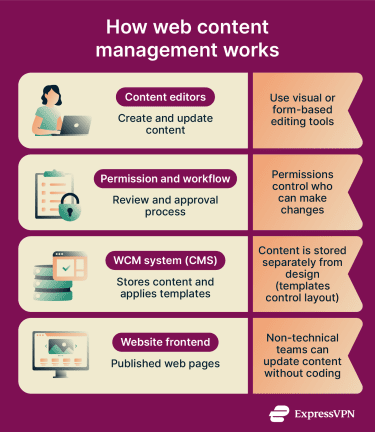
Types of web content management
WCMs fall into several categories:
- Traditional CMS: Combines content management and front-end presentation into one system, commonly used for full websites with built-in themes and templates.
- Headless CMS: Separates the content database from how the website is displayed to users and delivers content via APIs, which allow systems to exchange data.
- Hybrid CMS: Combines traditional and headless approaches, supporting both API delivery and built-in templates.
Why is web content management important?
Web content management is important because it keeps sites updated without every change requiring a developer. Marketing, editorial, and product teams can publish changes directly, while built-in workflows help reduce publishing errors and delays.
Templates improve consistency across web pages, with branding, layout, and structure remaining uniform across multiple publications and authors. Governance controls support compliance by managing access rights and approvals. Finally, modern WCMs help organizations manage high traffic and publish across multiple channels simultaneously.
Where is it used?
WCM platforms are versatile. They can be used for:
- Company websites and marketing pages: Landing pages, product updates, and campaigns.
- Newsrooms and editorial publishing: News posts, media assets, and publishing schedules.
- E-commerce product and content updates: Product descriptions and pricing updates alongside storefront functionalities.
- Support portals and documentation sites: Help centers and knowledge bases for customer support.
- Multi-region or multi-brand web networks: Multilingual web content management via centralized systems.
Risks and privacy concerns
Like any widely used web platform, a WCM can introduce security and privacy risks if it is not properly configured, maintained, and monitored.
- Weak or reused administrator credentials: Can allow attackers to take control of the entire site.
- Third-party plugins and themes: Increase the number of potential entry points for attackers, especially if they’re outdated or misconfigured.
- Broad permissions: May expose unpublished drafts or sensitive assets.
- Embedded tracking scripts: Can transmit visitor data to external services.
- Delayed updates: Leave known CMS vulnerabilities open to exploitation.
Further reading
- Supply chain attack: How it works and how to stay protected
- 502 bad gateway meaning and 10 easy steps to fix it fast
- What is access control? How it works and why it matters
- What is an intranet? Understanding its role in businesses