
Ghost pairing on WhatsApp: How the scam works


Ghost pairing is a reported social-engineering technique that targets WhatsApp's Linked Devices feature. It involves attackers tricking victims into linking a device controlled by the scammer to their WhatsApp account. This can lead to data exfiltration or account takeover, depending on the data the scammers have access to.
How ghost pairing attacks work on WhatsApp
To understand how ghost pairing works, it helps to understand the feature it targets.
WhatsApp's Linked Devices feature lets users access their account on up to four additional devices at the same time, including browsers, desktop apps, tablets, or secondary phones, without requiring the primary phone to stay online. Each linked device connects independently and receives messages in real time.
A device can be linked either by scanning a QR code or by entering an eight-digit pairing code to authorize the connection. Once verified, the new device is added to the account almost instantly.
Ghost pairing relies on social engineering to manipulate victims into authorizing a legitimate connection to the attacker's device, but without realizing it. The victim is often directed to a fake page where they're prompted to complete what appears to be a routine verification step. In reality, they're authorizing the attacker's browser as a linked device on their account.
Ghost pairing attacks: Step-by-step
Here's how the ghost pairing scams usually work.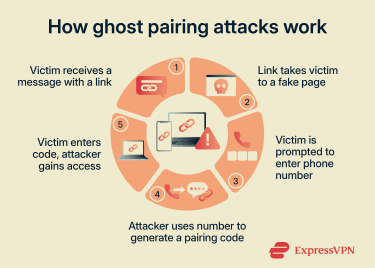
Step 1: Initial contact
The attack often begins with a short message from someone in the victim's contact list. In most cases, that contact's account has already been compromised.
The message is typically brief and generic, like "Hey, I just found your photo!" followed by a link.
Step 2: The phishing page
The link leads to a page designed to resemble a Meta service, such as Facebook. Because WhatsApp is part of Meta's ecosystem, the use of familiar branding may make the page appear more legitimate to some users.
The page tells the victim that to view the photo or content, they need to verify their identity by entering their phone number.
Step 3: The verification step
Once the phone number is submitted, the attacker uses it to initiate WhatsApp's legitimate device-linking process.
WhatsApp generates an eight-digit pairing code intended for the account owner. The phishing page displays it to the user as part of the fake verification flow. The user then enters the code inside WhatsApp, unknowingly authorizing a new linked device on their account.
The moment the code is entered, the pairing is complete, and WhatsApp registers the new linked session that belongs to the attacker.
Note: While most reported ghost pairing attacks on WhatsApp use the numeric code as a method of linking devices, attackers can also achieve this through a QR code. In that version, the attacker embeds a WhatsApp Web QR code into the fake page and instructs the victim to scan it. However, since most people use WhatsApp and their browser on the same phone, scanning a QR code displayed on the same device is awkward.
Why ghost pairing is a privacy risk
Ghost pairing can be dangerous because it gives attackers access to a victim's WhatsApp account without some of the signs users may associate with a traditional account takeover.
Because the connection is authorized through WhatsApp's own linked devices system, there is no password change, logout, or obvious account takeover alert. A linked session also remains active in the background, so the attacker doesn't need to stay online to retain access.
Research by Gen Digital also found evidence that the attack is driven by a reusable kit, a ready-made template that can be purchased and deployed with minimal technical knowledge. This may allow attackers to deploy the scam across multiple domains, since blocking one domain does not prevent others from using the same kit.
What attackers can access after pairing a device
Once an attacker successfully links their device to your WhatsApp account, a paired device functions like WhatsApp Web. This means the attacker can read incoming and existing messages in real time and view media files, shared links, and other synced chat data.
They can also download photos, videos, and voice notes shared in the victim's chats and send messages to contacts.
How the scam spreads through trusted contacts
One factor that may increase the likelihood of engagement is the use of trusted contacts. Victims often receive the phishing message from someone the victim already knows.
This is because once an unauthorized device has been paired, attackers use that account to send the same message to that person's contacts. From that point, messages sent by the attacker appear to come from someone the recipient already knows.
Signs of a potential ghost pairing attack
Ghost pairing attacks can be difficult to spot, but there are a few signs that can indicate an unauthorized device has been linked to your account.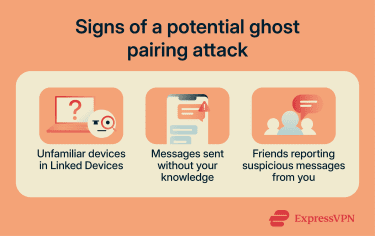
Unfamiliar devices in Linked Devices
The most reliable way to detect ghost pairing is to check your Linked Devices in the WhatsApp app. This shows every device currently connected to your account, along with the approximate location and time of the last activity.
Any entry you don't recognize, particularly a browser session you didn't initiate, should be treated as suspicious and removed immediately.
Messages sent without your knowledge
Scroll through your recent chats and look for messages you didn't send yourself. If you notice messages in your sent history that you didn't write, another device may be sending messages from your account. Because the attacker can send messages from a linked device, any outgoing activity you can't account for is a warning sign.
Friends reporting suspicious messages from you
If friends or other contacts receive suspicious messages from your WhatsApp account, they may reach out to you to confirm whether you actually sent the link and want them to click on it. If you receive such reports, it may indicate that someone else has access to your account.
How to prevent ghost pairing
Since ghost pairing relies on social engineering rather than technical intrusion, a few simple habits can help reduce the risk.
Avoid opening suspicious photos or login links
Avoiding ghost pairing attacks is similar to preventing phishing attacks. The attack depends on the victim tapping the initial link and then entering their phone number on the fake page.
If you receive a message containing a link, be skeptical before tapping it. If you click on the link and it asks for a phone number or to scan a QR code before viewing content, it's best to exit the page. Viewing media content rarely requires extra verification.
Confirm unusual messages outside WhatsApp
Messages appearing to come from a trusted contact are not always proof that the contact actually sent them. If a contact sends you something unexpected, verify through another channel before interacting with any links.
Do not authorize unexpected WhatsApp pairing requests
Keep in mind that WhatsApp doesn't ask users to link devices in order to view photos, files, or other content. Linked-device pairing only happens when a user intentionally initiates the process from within WhatsApp.
Your WhatsApp account can only be linked to another device after you manually approve the request and enter the pairing code yourself. The attacker can't do it on your behalf. Avoid entering pairing codes or approving device-linking requests that you did not initiate personally.
How to recover from a ghost pairing attack
Revoke unauthorized access
The first step is to remove the attacker's device from your account from the Linked Devices section in the WhatsApp app.
Follow these steps to find it:
- Open WhatsApp and tap the You button at the bottom-right corner of the app.
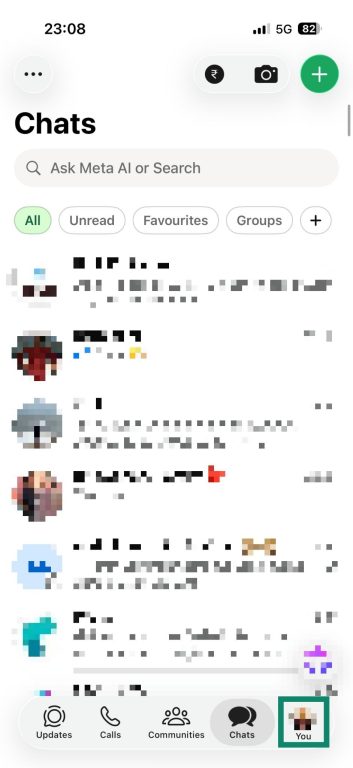
- Select Linked Devices.
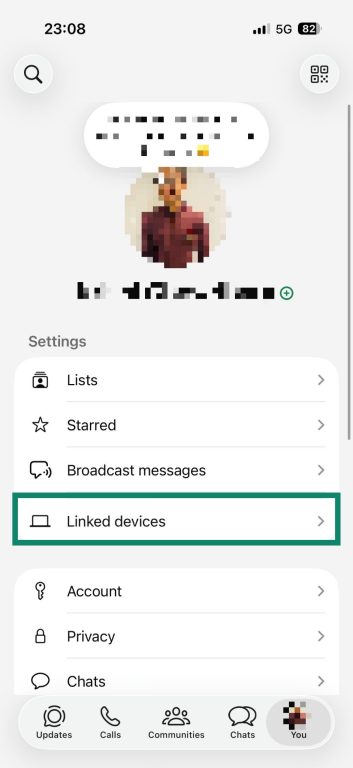
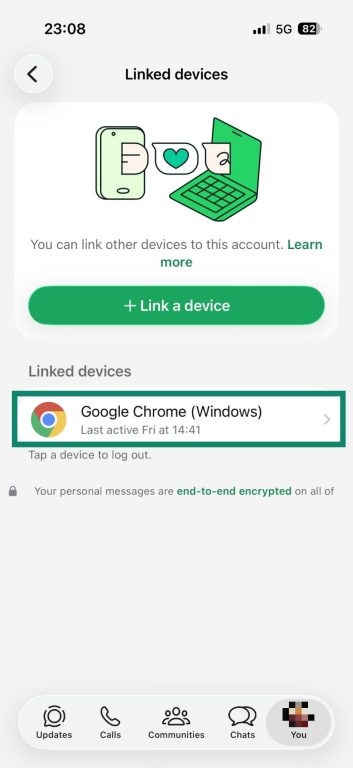
- You will see a list of all devices currently linked to your WhatsApp account. If you find an unfamiliar device, tap on it.
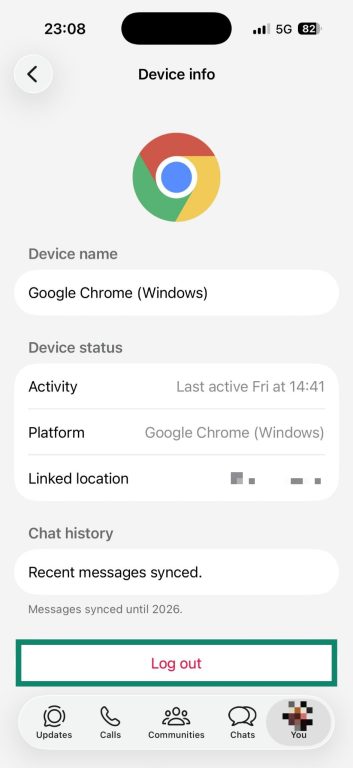
- WhatsApp will show details such as the device location and last active time. If you don't recognize the session, tap Log out to terminate it immediately.
If you typically use WhatsApp across multiple devices and are unsure which device is yours, simply log out of all linked devices. You can always log back in on your devices later.
Notify your contacts
If scammers have used your account to spread malicious links or scam messages to your contacts, it's important to warn them as soon as possible.
You can do this by posting a WhatsApp status or sharing a message on other platforms, informing your contacts and asking them not to click on suspicious links sent from your WhatsApp account.
Report the scam to WhatsApp
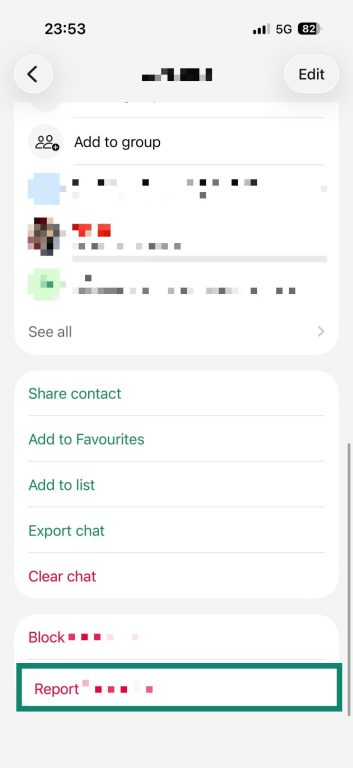
After revoking unauthorized access and notifying your contacts, you should also report the scam to WhatsApp. To do this:
- Open WhatsApp and tap the suspicious chat or sender.

- Tap the sender's phone number or profile information.
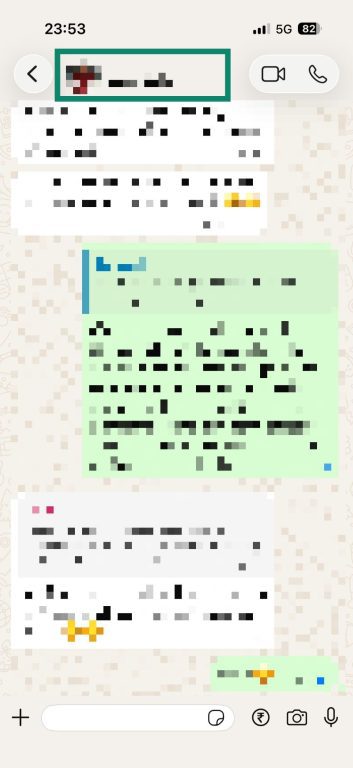
- Select Report.
- Tap Report and block.
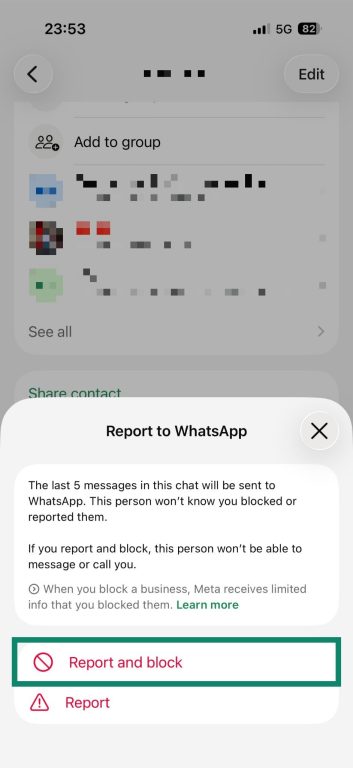
When you report the account, WhatsApp reviews the last five messages shared in the conversation and may take appropriate action against the account.
If you have also suffered financial loss because of the scam, consider reporting the incident to the appropriate cybercrime or law enforcement authorities in your region.
FAQ
Can someone access old WhatsApp messages after ghost pairing?
Does two-step verification stop ghost pairing completely?
Should I delete WhatsApp after a ghost pairing attack?
How often should I check linked devices?
What should I tell contacts if someone gained access to my WhatsApp account?