Is Plaid safe? What to know before connecting your bank account


If you've ever linked a U.S. bank account to a budgeting app, sent money through Venmo, or signed up for an investing platform, it’s likely that you've interacted with Plaid. It's a financial technology service that connects your bank to the apps you use, sharing account information so you don't have to enter details manually.
However, connecting a bank account through Plaid means sharing financial data with a third party, which is why questions about safety and privacy often come up.
This guide covers what Plaid is, how it works, how it protects your data, and the risks you should consider with any app that handles your financial data. It also offers advice on what you can do to stay in control of your financial information.
What is Plaid?
Plaid is a financial technology company that connects your bank account to apps that need financial data. Instead of entering your bank details separately in each app, you link your bank account to the app using Plaid. The app asks Plaid for your account data, and Plaid retrieves it from your bank.
You don’t use Plaid on its own; it appears inside another app when you choose to link a bank account. The connection screen is provided by Plaid, even though you’re still inside the other service.
Plaid also offers a consumer tool called Plaid Portal (my.plaid.com). You don't need a portal account to connect your bank to an app, but creating one lets you see which apps are connected to your accounts and what data has been shared. You can also use it to disconnect apps and delete your financial data from Plaid's systems.
To sign up, go to my.plaid.com and enter your mobile phone number. Plaid will send a verification code to confirm it's yours. You'll also need to provide and verify an email address to complete the setup.
How Plaid connects to your bank
When you link a bank account inside an app, Plaid opens its connection screen (called Plaid Link) and asks you to choose your financial institution and sign in. What happens next depends on your bank.
- OAuth-based connections: For supported banks, Plaid redirects you to your bank’s own login page. You sign in directly with your bank instead of entering credentials into Plaid. This is known as an OAuth-based connection, where access is shared using a secure token instead of your login details. The bank then sends Plaid a secure token, which is a permission that allows limited access to your data. Your username and password aren’t shared with Plaid in this flow.
- Credential-based connections: For banks that don’t support OAuth, Plaid asks for your username and password through Plaid Link. It uses those credentials to retrieve account data on your behalf. The app you're connecting to never sees your login details, but this flow does involve Plaid handling your credentials.
In both cases, the app you're connecting to doesn't receive your bank login credentials. It accesses your financial data through Plaid, not through a direct connection to your bank.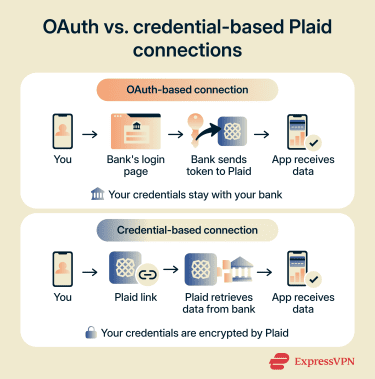
What apps and services use Plaid?
Plaid is used by thousands of apps and services. These include peer-to-peer payment apps like Venmo, investment platforms like Acorns, personal finance tools like SoFi, and lending services that verify balances or income during applications. Some business tools also use Plaid for account verification and bank transfers.
You'll typically see Plaid’s branding on the connection screen when linking a bank account. This indicates that Plaid is handling the connection rather than the app itself.
Related: Venmo, Cash App, and PayPal scams: How to stay safe
Is Plaid safe to use?
Plaid is a legitimate, widely adopted service used by major financial institutions and apps. Its security infrastructure includes multiple layers of protection, and the company holds recognized industry certifications.
How Plaid protects your data
Plaid uses 256-bit AES encryption for data at rest and Transport Layer Security (TLS) for data in transit. TLS is an industry-standard protocol that encrypts data as it moves between systems. The apps you connect to receive a secure token instead of your bank login details, meaning a breach at the app level wouldn't expose your bank credentials.
Multi-factor authentication (MFA) adds a second verification step when you log in, such as a one-time code sent to your phone. If your financial institution doesn't offer MFA, Plaid adds its own. The company runs 24/7 monitoring with automated alerts and an on-call security team.
Security audits and certifications
Plaid holds ISO 27001 and ISO 27701 certifications. ISO 27001 focuses on how a company protects sensitive information, including who can access data, how systems are monitored, and how security issues are handled. ISO 27701 builds on this by adding requirements for how personal data is collected, used, and stored. These certifications require regular independent audits to confirm the controls remain in place.
Plaid is also SSAE 18 SOC 2 Type II compliant. A SOC 2 Type II audit reviews how a company handles customer data over time, not just during a one-time check. It evaluates whether controls for data protection, system reliability, and restricted access to sensitive information are consistently followed.
Plaid also runs a bug bounty program, where independent security researchers are rewarded for responsibly reporting vulnerabilities. The company publishes security and compliance documentation through its public security portal, allowing transparency into its processes.
Why some users still have concerns
Even though Plaid requires apps to disclose its role during the connection process, some users encounter Plaid for the first time without recognizing what it is. The connection screen appears inside another app, and it may not be obvious that a separate company is involved in retrieving their bank data.
Connections also persist until explicitly revoked. Plaid continues to update data from connected banks in the background. If you stop using an app but don't disconnect it through the Plaid Portal or the app itself, the app may still be connected to your financial accounts. Regularly reviewing and revoking access can help maintain control over your data.
Read more: Is mobile banking safe?
What are the risks of using Plaid?
Sharing financial data through an intermediary means that more than one party may handle the information. The amount of data shared, how long access continues, and how receiving apps store it can affect exposure.
Sharing sensitive financial data
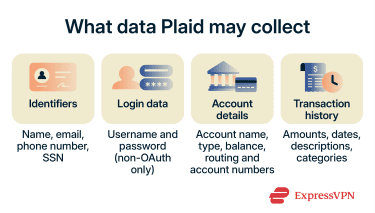 When you connect through Plaid, the data it can access depends on what the app requests and what your bank makes available. According to Plaid's privacy policy, this may include identifiers such as name, email, phone number, and in some cases, your Social Security number. It may also include login credentials for non-OAuth connections.
Other categories include account details such as account name, type, balance, and routing or account numbers. Transaction history may also be collected, including amounts, dates, descriptions, and categories.
Plaid states that it practices data minimization, meaning it shares only the specific data an app needs. For example, if an app only needs your checking account for payments, Plaid won't share other accounts with that app. However, the data Plaid retrieves from your bank may be broader than what the app ultimately receives.
When linking an account might not be worth it
Depending on what an app needs, linking a bank account through Plaid may not always be necessary. If an app only requires a one-time payment or balance check, entering card details may involve sharing less overall financial history than creating a persistent Plaid connection, which can provide ongoing access to account data. However, note that card details are still sensitive and come with their own risks, such as fraud if the information is exposed.
It’s also important to consider that Plaid’s security controls apply to data in transit and on its own systems. Once Plaid shares financial data with an app, that data is handled in accordance with the app’s security practices and privacy policy. For this reason, you should always research any app you connect to and verify that it’s legitimate and has strong security and privacy practices.
Related: How to make online payments safely and securely
Plaid and data privacy
Plaid’s privacy policy describes what data it may collect, how that data may be used, and how access can be managed.
What data Plaid can access
The data categories Plaid may collect are covered above. What varies is how much of that data reaches the app you're using. For example, a budgeting app might pull transaction histories going back up to 24 months. A lending app verifying income might access payroll data and deposit patterns. A payment app may only need account and routing numbers.
Plaid's privacy policy also states that it may use collected data to develop and improve its products, train machine learning models, and help prevent fraud. This applies to data Plaid collects, even if the connected app doesn't receive all of it. Plaid states that it doesn't sell or rent personal financial information to outside companies.
How consent and permissions work
During the Plaid Link flow, you're shown which accounts and data types the app is requesting. You can choose which accounts to share. For banks that support OAuth, this consent step happens on your bank's own website.
The connection screen also includes links to Plaid's privacy policy. After connecting, you can view active connections, shared data types, and apps accessing your information through the Plaid Portal.
How to limit or revoke access
To stop an app from accessing your bank data through Plaid, open the Plaid Portal and disconnect it. Disconnecting prevents the app from receiving new data, but it doesn't delete data the app has already stored. To remove that, you'd need to contact the app directly.
You can also remove your linked financial accounts from Plaid's systems. In the Plaid Portal, select the financial institution, choose “Delete from Plaid,” and confirm. Plaid notes that some data may be retained after deletion as required by applicable laws.
Some banks also allow third-party access to be revoked from within their own security settings, though this varies by institution.
How to use Plaid more safely
These steps can help limit exposure when using Plaid to connect financial accounts.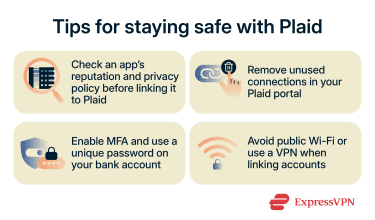
- Check the app before connecting: Before linking a bank account, check whether the app comes from a reputable company with a clear privacy policy. If an app is unfamiliar or recently launched, app store reviews and guides to identifying fake apps can help you assess whether it's worth connecting your financial data.
- Review your Plaid Portal regularly: Removing connections you no longer use is one of the most effective ways to reduce the number of services that can access your financial information.
- Secure your bank account: Enable MFA if you haven't already, and use a unique, strong password rather than reusing credentials from other accounts. A password manager like ExpressKeys can generate and store complex passwords so you don't have to remember them.
- Use a secure network: Public Wi-Fi can increase exposure when linking accounts or conducting online banking, especially on unsecured networks. Plaid connections are already protected by HTTPS encryption, but using a trusted virtual private network (VPN) adds an extra layer of safety. A VPN like ExpressVPN can provide additional protection by encrypting your traffic at the network level, which may help reduce risks from network operators or others on the same Wi-Fi.
Read more: How to secure your bank account from hackers
FAQ: Common questions about Plaid safety
Does Plaid sell your financial data?
Is Plaid safer than entering bank details manually?
Can Plaid access all of your bank accounts?
What happens after you disconnect Plaid?
Take the first step to protect yourself online. Try ExpressVPN risk-free.
Get ExpressVPN